


Video Feedback on Canvas
What is it? Providing timely and useful feedback to students on their work is important for so many reasons. We

Lifting the Mask of Anonymous Grading
Canvas provides you with the option to enable anonymisation when setting up an assignment. The two main settings when it
Accessible content design for learner variability: Visuals
Creating and Using Visuals Accessible visual design is better visual design for all users. When designing visuals or creating content

Setting your Grade Posting Policy
When managing student assessments, clarity and control over how grades are shared with learners is essential for maintaining transparency and

Set Up and Administration of Assignments
1. Make the instructions clear and unambiguous In your Canvas course, click ‘Assignments.’ Click ‘+Assignment’ to start setting up your

Canvas Course Term Dates
At the end of each Academic Year, courses in Canvas will become read-only. The below table outlines the dates courses are

Marking Submissions In Speedgrader and Releasing Grades/Feedback in Gradebook
Efficient and effective assessment is crucial in higher education, ensuring that students receive timely and constructive feedback. Canvas offers

Getting Started with Canvas New Analytics
This blog post briefly introduces the Canvas New Analytics feature and provides links to additional support materials. What is New

Canvas For Teaching Assistants
This blog post outlines the main areas of Canvas that a Teaching Assistant at Queens University should be comfortable with
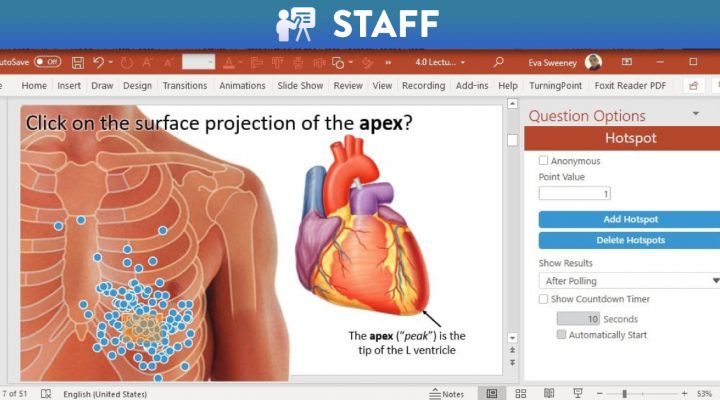
One New Thing: Interactive Hotspot Questions
Many of us have used Turningpoint (“PRS”) and may associate it with the infuriating error “TurningPoint Desktop has detected an open