

Portfolio in Canvas

Introducing Canvas Portfolio
Portfolio is the new offering from Instructure to replace the legacy tools ePortfolios and Portfolium. It will be available at Queen’s from July 2026 for all users.
It provides a flexible way for students to curate, reflect on, and showcase their work and skills development, both within their studies and beyond. It also offers improved functionality, including better mobile responsiveness, skill tagging to align with institutional outcomes and peer collaboration by letting learners add teammates to showcase collaborative projects.
Portfolio Types
The new functionality offers two portfolio types:
Showcase Portfolio (Learner Driven)
The Showcase Portfolio is expected to be the primary focus of use at Queen’s. Showcase Portfolios are created and managed by students and support storytelling and the validation of skills and competencies. They support multiple evidence types including Canvas assignments and allow students to submit artifacts directly and reflect on their work. Students can generate a shareable link to showcase their work externally (e.g. LinkedIn or with employers) and staff can review Showcase Portfolios and provide feedback where appropriate.
Evaluation Portfolio (Instructor Driven)
Evaluation Portfolios are designed to support staff in understanding a student’s learning and academic growth over time. Portfolios can be aligned with institutional or programme-level competencies to help learners demonstrate specific skills and knowledge. They provide a more structured approach than Showcase Portfolios and may be used to bring together evidence of learning (e.g. key assignments or activities), alongside student reflection, to support a more holistic view of development and progression.
Note: Evaluation Portfolios can only be accessed by the staff member who created them. Colleagues may wish to consider this limitation when deciding whether this portfolio type meets their needs. This functionality may evolve in future updates.
Potential Uses at Queen’s
Examples of potential use include:
- Supporting personal tutoring conversations, where students compile and share examples of their work and skills development with their Personal Tutor
- Supporting careers and employability development, enabling students to curate a professional showcase of their work and skills for use in applications, professional profiles (e.g. LinkedIn), or when engaging with employers
- Encouraging students to curate and present key pieces of work, such as projects, presentations, or placement activity, to demonstrate their achievements beyond an individual module
- Supporting reflection across modules or programmes, helping students make connections in their learning and track their development over time
- Capturing evidence of skills and competencies development, enabling students to evidence and articulate progress across their studies
Limitations to be aware of
Colleagues should be aware of some current limitations when planning to use Canvas Portfolio:
- Evaluation portfolios are only accessible to the staff member who created them
- Students do not receive notifications when feedback is added to their Showcase Portfolio. They must revisit the Portfolio tool to view comments
- Once a Showcase Portfolio is published, it cannot be edited by the student. Students would need to duplicate and update a new version
For these reasons, Portfolio is best used to support reflection, development and skills articulation, rather than as a core submission tool at this stage.
Using Portfolio in Practice
When incorporating Canvas Portfolio into teaching, learning or student support activities, colleagues may wish to consider the following good practice principles:
- Start with a clear purpose
Identify how the Portfolio will support learning (e.g. reflection, skills development, or personal tutoring) and communicate this clearly to students - Provide clear guidance and expectations
Students may be unfamiliar with Portfolio, so it is important to explain what is expected, how it will be used, and how it supports their learning or development - Use Portfolio for developmental activity
Portfolio is currently best suited to supporting reflection, skills articulation, and ongoing development, rather than high-stakes assessment - Support students to engage with feedback
As students do not receive notifications when feedback is added, colleagues may wish to prompt students to revisit their Portfolio to review and act on comments - Consider accessibility and inclusivity
When designing activities, colleagues should consider:- Providing clear instructions and structured guidance
- Offering alternative options where students are unable or prefer not to share work publicly
- Being mindful of differing levels of digital access and confidence
- Introduce Portfolio gradually
Colleagues may wish to explore the tool initially through small-scale or pilot activities before wider implementation with all students
How to access Portfolio
Canvas Portfolio will be available to all staff and students from July 2026.
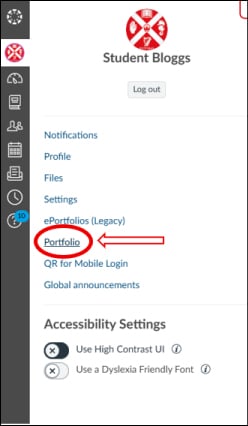
You can access Portfolio by clicking on ‘Account’ from the Global Menu, and then selecting ‘Portfolio’ (see the screenshot below).
Transition from Existing Tools
Portfolio replaces the existing ePortfolio and Portfolium tools.
- These legacy tools will be decommissioned in December 2026
- Staff and students currently using these tools are advised to download or back up any important content in advance
Further guidance on transitioning existing content will be shared ahead of decommissioning.
Interested in Getting Started?
You can find step-by-step instructions for creating, editing, and sharing portfolios in the Canvas Guides.
- For instructors: Canvas Instructor Guides for Portfolio
- For students: Canvas Student Guides for Portfolio