
Introducing Scheduled Feedback in the Canvas Gradebook
What is the Feature?
In the Gradebook, instructors can now schedule the visibility of grades and feedback separately. Traditionally, scores and feedback appear together once released. With this new option, you can choose specific release dates and times for each component — letting you hold back comments or grades until the moment that makes the most sense for learning.
Pedagogical Uses
Here are some ways you can make the most of Scheduled Feedback:
Encourage deeper learning: Release feedback before the grade to prompt students to focus on improvement rather than points.
Coordinate with instruction: Align feedback with a scheduled class discussion or workshop so students arrive prepared.
Support formative assessment: Share comments at a targeted time to guide students before they begin their next task.
Manage workload: Enter feedback ahead of time but schedule its release for when you’re ready for students to engage with it.
How It Works: A Simple Workflow
Open the Gradebook: Navigate to Grades in your Canvas course.
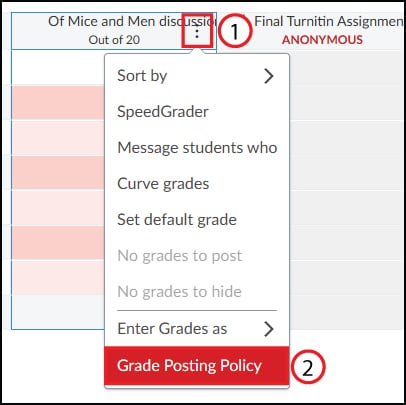
Choose the assignment: Click the assignment’s options menu (1) and go to Grade Posting Policy (2).
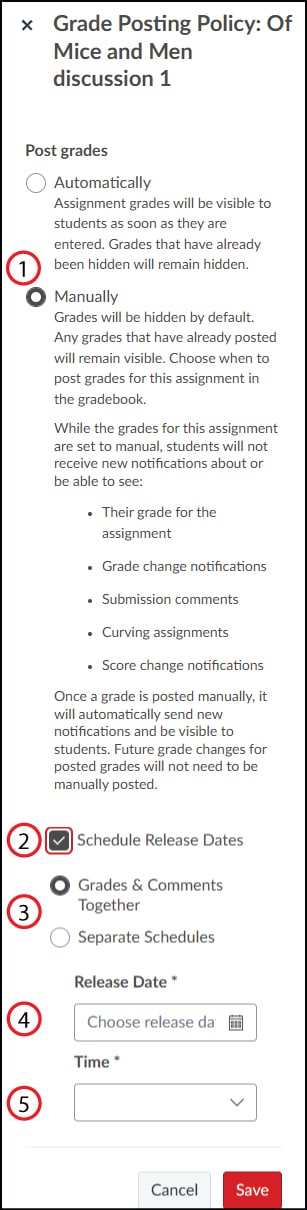
Enable scheduling: Select Manually posting (1) and check Schedule Release Dates (2).
Decide timing: Choose whether to release grades and comments together or on separate schedules (3).
Set dates/times: Enter the release date (4) and time (5) for both grades and comments.
Once scheduled, Canvas handles the rest — automatically making feedback visible to students at the right moment. If you release grades manually before the scheduled release time, that manual publish overrides the schedule.