

Microsoft Copilot at QUB: what it helps with, what it doesn’t, and how to use it safely
If you’ve heard people talking about AI and thought “I’m not touching that in case I get into trouble” — you’re not alone.
But here’s the key point: using Microsoft Copilot to support your studying is not automatically an academic offence.
Like any tool, it depends on how you use it, what the task is, and what your School or module guidance says.
At QUB, students are encouraged to use AI thoughtfully and responsibly, with a clear understanding of its strengths, limitations, and the rules that apply to assessed work.
What is Copilot?
Microsoft Copilot Chat is an AI assistant available to higher education students through eligible education accounts at no extra cost. It can help you understand information, organise your ideas, summarise material, and get started when you’re stuck.
Depending on how you access it, Copilot can:
- answer questions in chat
- help you work with text you paste in
- summarise documents or notes
- help inside Microsoft 365 apps like Word, PowerPoint, OneNote and Edge in supported contexts
Why students find it useful
Copilot can be a really helpful digital study support tool when you use it to support your thinking rather than replace it.
It can help with:
- breaking down a confusing task into smaller steps
- turning lecture notes into a short recap
- explaining a tricky concept in plainer language
- helping you plan a study session or revision schedule
- creating practice questions from your own notes
- checking your writing for clarity, grammar, or structure
- helping you compare viewpoints or identify themes in reading
Used like this, Copilot is less of an “essay writer” and more of a study assistant.
What Copilot is good at
Copilot is often useful for:
- summarising long or messy information
- simplifying difficult wording
- helping you get started
- organising ideas
- creating revision prompts or checklists
- improving clarity in your own writing
What Copilot is not good at
Copilot still has limitations. QUB guidance encourages students to understand those limitations and use AI critically.
Be careful because it can:
- get facts wrong
- miss nuance
- oversimplify complex topics
- produce weak or generic wording
- give answers that sound confident but are not fully reliable
So the rule is simple: use it to support your study, not to do your academic judgement for you.
Safe ways to use Copilot
These are usually lower-risk examples of responsible use:
- summarising your own lecture notes into bullet points
- asking for a concept to be explained in simpler language
- turning reading into revision questions
- asking it to suggest a timeline for an assignment
- checking a paragraph you have already written for grammar and clarity
- asking it to help you spot gaps in your understanding
Risky ways to use Copilot
These are the kinds of uses that can cause problems:
- asking it to write part or all of an assignment for submission
- copying AI-generated text straight into coursework
- using it where your module guidance says AI is restricted or not allowed
- relying on it for references without checking them
- submitting work you do not properly understand yourself
That is where students can drift into academic misconduct territory.
A good rule of thumb
Ask yourself:
Did Copilot help me learn, plan, revise, or improve my own work?
That is usually the safer zone.
Or:
Did Copilot do thinking or writing that I am supposed to do myself for assessment?
That is where risk increases.
Use your QUB account and look for the green shield
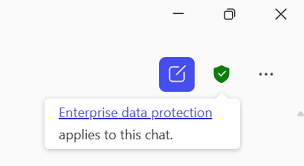
Microsoft says Copilot Chat for work and education includes enterprise data protection, and this is shown by a green shield in the interface.
That makes it a better option than jumping straight into random public AI tools. It is still important to use good judgement, but signing in properly matters.
Top tips for using Copilot well
- paste in your own notes or source material where possible
- ask focused questions
- check facts against your actual reading
- do not trust references unless you verify them
- rewrite ideas in your own words
- always check your School or module guidance before using AI in assessed work
Try prompts like these
- “Summarise these lecture notes into 5 key points.”
- “Explain this concept in plain English without losing the important detail.”
- “Turn these notes into 5 revision questions.”
- “Help me plan this assignment into smaller steps over one week.”
- “Review this paragraph for grammar, punctuation and clarity only — do not change my meaning.”
The bottom line
Copilot can be a really useful digital study support tool at QUB. It can help you get organised, understand difficult content, and study more efficiently. But it is not a free pass to use AI however you like.
Use it to support your learning, not replace your work. And always check what your School or module says before using AI in assessed tasks.
For more guidance see AI Step by Step
Check out this guide: Using AI Safely and Smartly at QUB
👉Check Out These Posts on AI Tools and Resources
- NotebookLM – The Study Tool That Makes Your Notes Actually Useful
- 5 AI Prompts Every Student Should Try
- Top AI Tools to Save Time & Study Smarter
Where to Get Support
- QUB AI Support for Students
- QUB AI Hub
- Assistive Tech Hub
- Microsoft Student AI Hub
- Microsoft AI Skills Fest
- Microsoft AI Fluency Pathway
✨ Bottom line: AI isn’t here to replace you. But if you use it responsibly — as a digital learning assistant — it can help you study smarter, save time, and feel more confident.
Support and Training
- 👉 IT Helpdesk – For licensing or technical issues.
- 👉 Workshops – Check upcoming Study Smarts sessions to learn how to use these tools.
- 👉 1:1 support – Book a session with the Assistive Technology Coordinator.
Discover more from Assistive Technology Hub
Subscribe to get the latest posts sent to your email.

