
First 1-1 Support Session Toolkit
Supporting a student starts long before the strategy work — it begins with understanding who they are, what supports they already have in place, and how their academic journey is being shaped by their ISSA, their DSA package, and their wider needs. This toolkit brings together everything you need for that essential first conversation, plus guidance on planning structured and effective sessions throughout the semester.
1. Before You Begin: Key Questions for Your First Session
These early conversations help you understand what’s already in place and how you can tailor your support.
🔹 Are they registered with Accessible Learning Services?
If yes, they will have an Individual Student Support Agreement (ISSA).
This outlines their in-course reasonable adjustments such as:
- Deadline flexibility and how to request them (i.e. through the Student Request Portal)
- Extra time or rest breaks in exams
- Exam arrangements (e.g., Green Room)
Students can access their ISSA through their QSIS account –
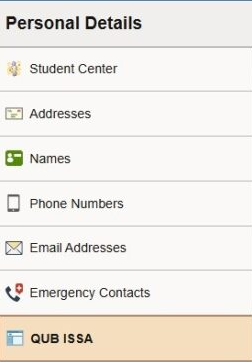
Sign into QSIS, navigate down the left hand menu to ISSA where they can view their reasonable adjustments such as flexibility with deadlines etc.
🔹 Do they know what their DSA package includes?
If they are funded through DSA or another external funder, ask whether they have a copy of:
- Their Needs Assessment Report, or, Their DSA2 award letter
Most students will have been given a comprehensive package including assistive technology and training. Knowing this allows you to:
- Understand what tools they already have
- Integrate those tools into your sessions
- Spot gaps (e.g., AT training not yet taken up)
- Help them get the full benefit of their support package
Why Session Planning Matters
Structured sessions provide clarity, ensure that learning goals are met, and create a sense of progress for the student. A well-planned session helps:
- Identify areas that need further support.
- Keep the focus on key learning objectives.
- Track student progress over time.
🔹 What assistive software do they use regularly—if any?
Ask: “Have you used any of your software yet? Do you know what it’s for?”
If the answer is not really, that’s absolutely fine — it gives you a great starting point.
Check out this handy guide by UU on DSA software –
2. Making the Most of Assistive Technology
Knowing a student’s tools allows you to weave them naturally into academic skill-building:
- MindView / Mind Mapping Tools → essay planning, structuring arguments, revision maps
- Read&Write→ proofreading with read-aloud, reading comprehension
- Genio or Captioned note-taking software → managing class notes, summarising lectures
- Scholarcy → summarising tool for reading and research, helps with planning and time management
If your student mentions software you’re unfamiliar with, don’t panic — we can arrange CPD or training sessions, or direct you to provider training hubs such as Everway Academy, MindView, and Genio.
3. Planning Your Tutoring Sessions
Once the foundation is set, the rest of your support sessions can follow a simple, structured flow. Clear structure helps you and your student stay on track, see progress, and build confidence.
Session Overview
Include the basics:
- Student Name
- Date
- Session Number (first, follow-up, etc.)
- Duration (typically 45–60 minutes)
Setting Session Goals
Try to keep goals short, focused, and tailored. Examples:
- Build confidence using Read&Write for proofreading
- Explore strategies for organising assignments and deadlines
- Plan an essay using a mind-mapping tool
3. Identifying Key Focus Areas
Consider which academic skills or support areas you’ll target. Common focus areas include:
- Reading Comprehension
- Essay Planning
- Proofreading Techniques
- Time Management
- Assistive Technology (e.g., Read Aloud, Screen Masking, Mind Mapping Tools)
4. Structuring Activities
Break down the session into manageable segments to maintain engagement:
- Check-in (5 mins): Discuss current challenges, successes, and any feedback from previous sessions.
- Skill Focus (15 mins): Introduce or demonstrate a new strategy or tool.
- Guided Practice (20 mins): Support the student as they apply the new strategy with real examples.
- Reflection (5 mins): Review what went well, identify any challenges, and set action points for the next session.
5. Integrating Assistive Technology (if applicable)
If using technology:
- Tool Used: (e.g., Read&Write, Writing Helper, Global Tasks, Notetaking Apps)
- Purpose: Clarify how the tool supports learning.
- Feedback: Note how the student engaged with the tool and any adjustments needed.
6. Action Points for the Next Session
End each session with clear, actionable tasks:
- Complete a short exercise related to today’s session.
- Practice using a new study technique or assistive tool.
7. Reflections for the Tutor
After the session, take a few minutes to reflect:
- What went well?
- Were there any challenges?
- What should be revisited in the next session?
Resources for Session Planning
Support Channels
- ALS Info Hub: Access the latest resources, events, and student support opportunities for ALS registered students.
- For more information on providing support to students, please visit the Register of Support Providers at QUB.
Discover more from Assistive Technology Hub
Subscribe to get the latest posts sent to your email.

